


Every modern website or application needs a reliable way to store and manage information. From customer accounts and product listings to blog posts and online orders, databases help applications organize data and retrieve it when needed.
However, a poorly designed database can create duplicate records, slow queries, inconsistent information, and maintenance problems as an application grows. Good database design helps developers build software that is easier to manage, maintain, and scale.
In this guide, we will explain database design for beginners, explore important database concepts, and discuss practical techniques for designing efficient databases.
What Is Database Design?
Database design is the process of organizing information into a structured format so that it can be stored, retrieved, updated, and maintained efficiently.
Before building a database, developers need to understand what information an application will manage and how different pieces of information relate to one another.
For example, an online store may need to store customer details, product information, orders, and payments. A well-designed database organizes these records and establishes relationships between them.
Database design typically involves identifying data requirements, selecting suitable tables or collections, defining relationships, choosing data types, and applying rules to maintain data accuracy.
Why Is Database Design Important?
1. It Reduces Duplicate Data:
Without a clear structure, the same information may be stored repeatedly in multiple places. This can make updates difficult and introduce inconsistencies.
A well-designed relational database stores information in appropriate tables and uses relationships to connect related records.
2. It Improves Data Accuracy:
Databases can use constraints, validation rules, and relationships to prevent certain types of invalid information.
For example, a foreign key can help ensure that an order references an existing customer. Other constraints can prevent duplicate email addresses or require important fields to contain values.
3. It Supports Better Application Performance:
The structure of a database affects how efficiently information can be retrieved and updated.
Appropriate data types, well-designed queries, and carefully selected indexes can improve performance. The best approach depends on the application’s workload and the amount of data it processes.
4. It Makes Applications Easier to Maintain:
A clear database structure helps developers understand where information belongs and how it connects to other records.
This becomes particularly valuable when a project grows, additional features are introduced, or new developers join the team.
Understanding the Basic Components of a Database:
Before designing a database, it is useful to understand its main components.
Tables:
A table organizes related information into rows and columns. In a relational database, a table might represent customers, products, employees, or orders.
For example, a customers table could contain customer IDs, names, email addresses, and registration dates.
Rows:
A row represents one record in a table. Each row in a customers table might represent a different customer.
Columns:
A column represents a particular attribute of a record, such as a customer’s name, email address, or registration date.
Each column should have an appropriate data type, such as text, integer, date, or decimal.
Primary Keys:
A primary key uniquely identifies each record in a table.
For example, a customer ID can distinguish one customer from another, even if two customers have the same name.
A good primary key should remain stable and uniquely identify its record.
Foreign Keys:
A foreign key connects records in different tables by referencing a key in another table.
For example, an orders table might contain a customer ID that references the corresponding record in the customers table.
This relationship helps maintain consistency between related records.
Types of Database Relationships:
Relationships describe how records in different tables are connected.
One-to-One Relationship:
In a one-to-one relationship, one record in a table corresponds to at most one record in another table, and vice versa.
For example, an application might store a user’s optional profile settings in a separate table. A unique constraint on the related user ID can enforce the one-to-one relationship.
This structure can be useful when separating optional information or data that requires different access controls.
One-to-Many Relationship:
A one-to-many relationship occurs when one record is associated with multiple records in another table.
For example, one customer may place several orders, but each order belongs to one customer.
A simplified structure could look like this:
- Customers:
customer_id,name,email - Orders:
order_id,customer_id,order_date
The customer_id in the orders table references the customers table.
This is one of the most common relationship types in business applications.
Many-to-Many Relationship:
A many-to-many relationship occurs when multiple records in one table can relate to multiple records in another table.
For example, a blog article can have several categories, and each category can contain several articles.
A relational database commonly handles this relationship using a junction table:
- Articles:
article_id,title - Categories:
category_id,category_name - Article_Categories:
article_id,category_id
The junction table stores the associations between articles and categories. A composite primary key or suitable unique constraint can prevent duplicate associations.
What Is Database Normalization?
Database normalization is a process used to organize relational data and reduce unnecessary duplication and update problems.
Normalization involves applying rules called normal forms. The appropriate level depends on the application’s requirements, but understanding the first three normal forms provides a useful starting point.
First Normal Form (1NF):
First normal form generally requires each column to contain a single value from its intended domain rather than a repeating list of values in one field.
For example, instead of storing several product IDs in one order column, a relational design can represent order items as separate records.
Second Normal Form (2NF):
Second normal form builds on first normal form. It requires non-key attributes to depend on the whole of each candidate key, rather than only part of a composite key.
This matters when a table uses a key made from multiple columns.
Third Normal Form (3NF):
Third normal form further reduces dependencies in which non-key attributes depend on other non-key attributes rather than directly on a key.
For example, storing a customer’s city name repeatedly in every order can create update problems. Depending on the requirements, customer details may belong in a separate customers table.
Normalization helps improve consistency, but database design should always reflect actual data requirements. In some systems, carefully controlled denormalization may improve read performance.
How to Design a Database Step by Step:
Step 1: Understand the Application Requirements:
Start by identifying the information your application needs to store.
For an online store, requirements may include:
- Customer registration and account details.
- Product names, prices, and stock quantities.
- Customer orders and order items.
- Payment status and transaction references.
- Shipping information.
Discuss what each feature needs to do before deciding how the data should be organized.
Step 2: Identify the Main Entities:
Entities represent the important objects or concepts in your application.
For an online store, the main entities might include customers, products, orders, order items, and payments.
Each entity will usually become a table in a relational database, although the final structure depends on the requirements.
Step 3: Define Attributes and Data Types:
List the attributes required for each entity and select suitable data types.
For example:
customer_id: integer or another suitable identifier.name: text.email: text with an appropriate uniqueness rule.created_at: timestamp.
For prices, use an appropriate decimal or fixed-precision representation rather than relying on floating-point arithmetic for exact monetary values.
Choose data types based on the database system and the application’s requirements.
Step 4: Choose Primary and Foreign Keys:
Determine how each record will be uniquely identified.
Then define relationships using foreign keys where supported and appropriate.
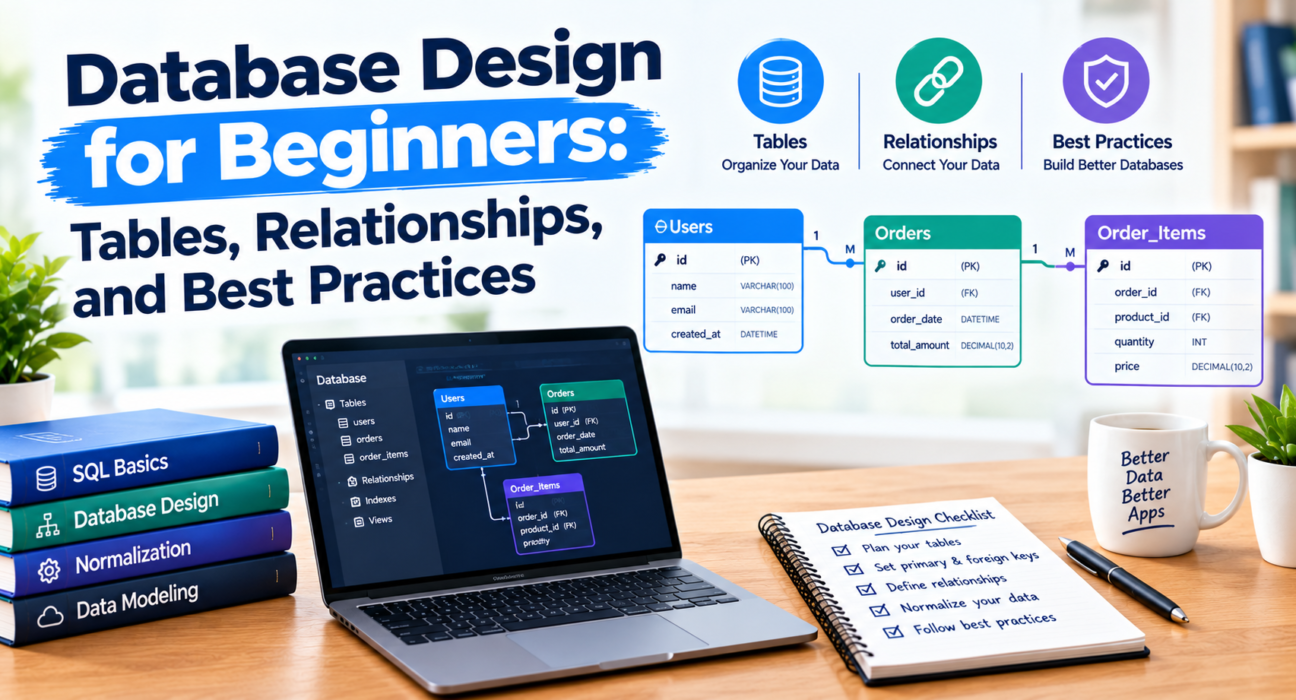
For instance, the orders table can reference customers through customer_id. An order items table can reference both an order and a product.
These relationships help keep records connected and reduce the risk of invalid references.
Step 5: Review the Design for Duplication:
Examine whether the same information is being stored unnecessarily in multiple places.
Consider which details should belong to customers, products, orders, or order items.
Remember that some information, such as the product price charged at the time of an order, may need to be recorded as a historical snapshot. It should not necessarily change when the current product price changes.
Step 6: Create an Entity-Relationship Diagram:
An entity-relationship diagram, often called an ERD, visually represents entities, attributes, and their relationships.
An ERD can help developers identify missing relationships, duplicate information, and design problems before writing database code.
For larger projects, reviewing the diagram with other team members can prevent costly changes later.
Step 7: Implement and Test the Database:
Create the tables, constraints, indexes, and relationships using your selected database system.
Then test common operations, including inserting records, retrieving information, updating data, and deleting records.
Test edge cases as well. For example, determine what should happen when a customer with existing orders is deleted.
Use transactions where multiple changes must succeed or fail together.
Example: A Simple Online Store Database:
Imagine that you are building an online store. A basic relational design might contain four tables.
Customers:
Stores customer identifiers, names, and email addresses.
Products:
Stores product identifiers, names, descriptions, and current prices.
Orders:
Stores order identifiers, the customer associated with each order, and order dates.
Order_Items:
Stores the products included in each order, their quantities, and the prices charged at the time of purchase.
The relationships would work as follows:
- One customer can have multiple orders.
- One order can contain multiple order items.
- One product can appear in multiple order items.
- Each order item belongs to one order and references a product.
This structure separates customer, product, and order information while allowing the application to retrieve related data through queries.
For an actual payment system, additional design work would be needed for transaction records, refunds, security, audit trails, and payment-provider integration.
Choosing the Right Database Technology:
Different database technologies are suitable for different workloads.
Relational Databases:
Relational databases organize structured information into tables and commonly use SQL to query and manage data.
Examples include PostgreSQL, MySQL, and Microsoft SQL Server.
They are often suitable for applications that require structured relationships, constraints, and transactions.
NoSQL Databases:
NoSQL databases include document, key-value, wide-column, and graph database systems.
A document database, for example, may store information in document-like structures rather than traditional relational tables.
Examples include MongoDB for document-oriented data and Redis for key-value use cases.
NoSQL is not automatically faster or better than SQL. The best choice depends on data structure, query patterns, consistency requirements, operational needs, and the team’s experience.
How Should Beginners Choose?
Before selecting a database, consider:
- The type and structure of your data.
- The relationships between records.
- The queries your application needs.
- Transaction and consistency requirements.
- Expected data volume and growth.
- Hosting, backup, security, and maintenance needs.
For many traditional business applications, starting with a relational database is a practical choice. Other architectures may be better when the requirements clearly support them.
Common Database Design Mistakes to Avoid:
Storing Multiple Values in One Field:
Putting several unrelated values into one field can make searching, validation, and updating more difficult. Use a suitable relational structure when the values need to be managed individually.
Ignoring Constraints:
Without suitable constraints, applications may store duplicate or invalid information. Use primary keys, foreign keys, uniqueness rules, and other appropriate constraints.
Choosing Inappropriate Data Types:
Storing dates, numbers, and monetary values as generic text can complicate validation and calculations. Select data types that match the meaning of the information.
Adding Indexes Without a Plan:
Indexes can improve read performance, but they also require storage and can slow down writes. Add indexes based on common queries and validate their impact using query plans and performance testing.
Ignoring Backups and Recovery:
A database is valuable only if its information can be protected and recovered when needed.
Create appropriate backups, define recovery objectives, and periodically test restoration procedures. A backup that has never been tested may not provide the protection you expect.
Failing to Plan for Security:
Database security should be considered from the beginning.
Use least-privilege access, secure authentication, encrypted connections where appropriate, and safe query practices. Applications should use parameterized queries to reduce SQL injection risks.
Avoid storing passwords as plain text. Use established password-hashing methods through trusted libraries, and never store sensitive payment-card data unless the system is specifically designed and authorized to handle it.
How Database Design Connects With Modern Software Development?
Database design is closely connected to other areas of software development.
An application programming interface (API) often retrieves or updates information in a database. A well-designed data model can make API behavior more predictable and easier to maintain.
Database query efficiency can also affect website performance, particularly when pages need to retrieve many records or perform complex operations.
For more information, read our guides on API development and website performance optimization.
When developing an application, database design, API architecture, and performance testing should work together rather than being treated as unrelated tasks.
At BlogToBlogging, we aim to make software development concepts easier to understand through practical guides that help beginners and experienced readers build their knowledge.
Conclusion:
Database design is a foundational skill for building reliable websites, applications, and business software. Understanding tables, keys, relationships, normalization, data types, and constraints helps developers organize information effectively.
Start by understanding your application’s requirements, identifying its main entities, and designing the relationships between them. Then implement the database, test common operations, and review performance and security as the project develops.
A thoughtful database design can reduce avoidable errors, simplify maintenance, and provide a stronger foundation for future features.